Saturday, 24 February 2018

Sharing our learning!


We attended Edcamp Waterloo Region today and got to share our learning! It was very exciting to share what we have tried and observed in our classrooms so far. We shared our work with Lightbot, unplugged coding, and activities using the book Hello Ruby by  Linda Liukas, as well as other ideas and activities. This led to rich discussion and ideas from all those attending the Coding in the Early Years session.

Unplugged activities and Makey Makey
Sue discussing learning activities

Sarah updating the shared doc,
Jennifer discussing her learning

For more information, check out these links to information on this discussion and Edcamp Waterloo Region:
Group notes from Coding in the Early Years
#edcamperwr

Thursday, 22 February 2018

No Fear Coding


It's not just about computers... coding teaches us how to think. Heidi Williams suggests that coding is for everyone. There are many reasons for teaching coding, such as:

  • Teaching perseverance
  • Teaching students how to think and reason (computational thinking)
  • It's about creativity and expression
  • It's another way to demonstrate content knowledge (just like creating a Power-Point or display board). 
  • It's a way to see math in action


To briefly summarize her first chapter, Heidi Williams gives us five reasons why coding is critical for K-5 Students.
1.  Making their thinking visible
2. Sustaining Creativitiy
3. Encouraging Computational Thinking
4. Fostering Future-Ready Skills
5. Empowering Students to Take Action

I feel like this book is meant for me (Sarah). Beginning this project, I really didn't know a lot about coding. I'm not realizing the importance of coding and seeing first hand how students think and problem solve. Each student is different and coding gives them a way to express their thinking, make it visible (as Heidi says) by using the activities to give shapes, thoughts and actions to their thinking. 

Lesson Plans and Resources

Check out our Lesson Plans and Resources that we have collected so far:

Block Coding

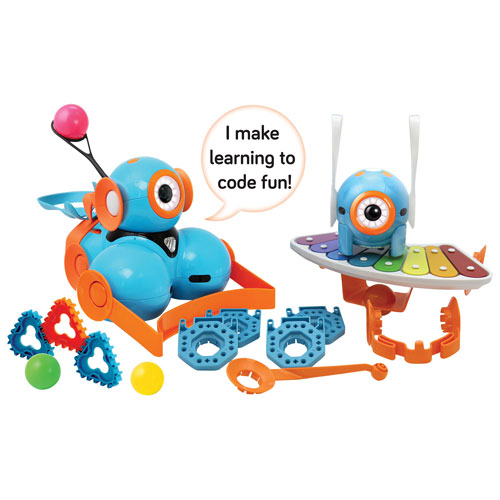
Today we explored the Wonder Pack! Meet Dot and Dash, some pretty cool robots. We learned how to block code the robots to make them talk, move, light up and more.


Image result for wonder pack dot and dash
We explored the robots ourselves using the Blockly app. Here is Jen trying it out! Dash

We are learning alongside the students. Here you will see the students using the Wonder app and students are working through the puzzles to explore all of the functions that the Dash robot has. You'll notice, we get stuck! You can clap to make the Dash move and it doesn't work! Turns out we needed to clap twice. Thanks to Carter and Kate and for helping us out.

Some friends from Sarah's class explored the Wonder App. We needed to go through the quests to learn how to do the block coding and discover all of the capabilities that the Dash has. After that, we set out a track in the hallway using snap cubes and coded the Dash using the Blockly app. Here is our code:


Here is what it looks like:

Dash Hallway Track


Makey Makey!

In January we received the Makey Makey's! We were very excited try them out and problem solve alongside the students.

What's Makey Makey?

Makey Makey is an invention kit for the 21st century. Turn everyday objects into touchpads and combine them with the internet. It's a simple Invention Kit for Beginners and Experts doing art, engineering, and everything inbetween.

Here are some video's of us exploring with Kindergarten Students 

Makey Makey Video
Makey Makey Piano


There are so many neat things you can do with the Makey Makey. It is a great tool to use to introduce students to the concept of circuits and to see how they work. Students can use interesting materials such as playdough, tin foil, celery and so much more to make the circuit complete. Check out some lesson plans. You'll need a computer or Chromebook and a Makey Makey. Try the Banana Piano (Banana Piano
Instead of using computer keyboard buttons to play the piano, you can hook up the Makey Makey to something fun, like bananas, and the bananas become your piano keys! 


Tuesday, 30 January 2018

It's Been Awhile

Our blog has been quiet for awhile but we've been working hard in our classrooms, implementing our lessons that we have found and created.

We met as a team in December and continued adding lesson plans to our repertoire. See here Lesson Plans


In K7 Sarah's class, we read the book, "Hello Ruby, Adventures in Coding" By Linda Liukas. Check out here website here- Hello Ruby This is a great place to start to teach coding, even in Kindergarten! Hello Ruby has a lot of lesson plans to try out. So far in K7 we have tried
Sequence
Decomposition
Pattern Recognition
Map Algorithms

We can't say enough about this book. The important thing students have learned so far is that in coding, it is important to give specific instructions. Everything needs to be in little steps. We've made mistakes but we keep coming back and discussing them because we learn from our mistakes! 


Hello Ruby Coding

Thursday, 9 November 2017

What Have We Done So Far?

What Have We Done So Far? 


May 2017
Jen, Sue and Sarah went to Toronto for 2 days of training. We were able to get a start on our project, set some goals, and participate in some great sessions. 

We participated in budget sessions, practical project management, working with our team, using Teach Ontario and learning sessions. We listened to some great talks from members from OTF, OECTA and the Ministry of Education. 

Check out the video we recorded after our training session! 


September 2017
 We explored the Math continuum found here: Edugains
We then discussed how the Full Day Kindergarten Curriculum fits into the Grade 1 and Grade 2 Math Curriculum and created our own continuum found here: FDK/Grade 1/Grade 2 Curriculum


October 2017
We began creating lessons plans and ideas for our "resource bank." We want to provide educators with lesson ideas that promote computational thinking in the early years. 
Check out our first lesson plan here 

Computational Thinking

WHAT IS COMPUTATIONAL THINKING!? 


We had a great discussion on what computational thinking is. Through this discussion we found some excellent resources. We kept coming back to this graphic:


Computational thinking is the thought processes involved in formulating a problem and expressing its solution(s) in such a way that a computer—human or machine—can effectively carry out.

It is broken down into the following steps:
  1. Taking Apart/Breaking down the problem
  2. Finding Similarities and Differences (recognizing patterns)
  3. Pattern Generalization-applying logic to the pattern you recognize. Exists only as an idea.
  4. Procedure- the steps/instructions that can be applied


Excellent Website for Educators exploring coding in all grades- Barefootcas

Our TLLP 2017-2018 Project

Introduction to our Project In November, 2016 we met to create our proposal for the TLLP. We were very excited about this opportunity an...